Can’t find your ancestor? Have you tried our unique 'Names' feature?
When researching your family history, it’s not unusual to find an ancestor missing from a census, parish register or birth/marriage/death (BMD) index in which you know they should appear - because your other research or knowledge has already told you so. They are simply not there!
Doing a little detective work around their name will sometimes reveal them to us. For example, our own blog writer was seeking Hannah Octavia Seares in the 1891 census using a paid-for site, but could not find any trace. She resorted to a painstaking search of every ‘Hannah’ in the area, eventually finding her transcribed as ‘Hannah O’Scares’. No wonder she had been difficult to find! On viewing the very loopy handwriting on the census page, it was clear to see how the mistake had been made by the transcriber.
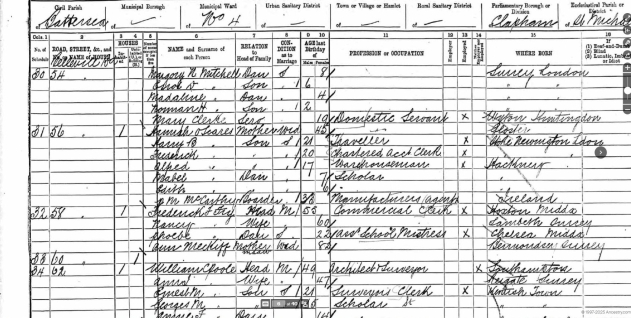
Hannah Seares - mis-transcribed as Hannah O'Scares - her record from 1891.
Of course, in a perfect world, all registrars, census enumerators and clergy would have written clearly. But they were only human – as are all the transcribers who work on their records, however diligent they may be. (And our volunteer transcribers at FreeBMD, FreeCEN and FreeREG pride themselves on the very high quality of their transcriptions, with every single transcription being checked by two different people.)
Therefore, we must accept that errors in BMD indexes, census and parish records are inevitable – both at source and in transcription – and so we must become proficient at detective work! But this is where FreeCEN, FreeREG and the new FreeBMD offer something unique over the other genealogy sites: our ‘Names’ feature.
How does it work?
IF you know the county and place in which your ancestor was living, you can search on all the people's names (both surnames and forenames) in a list for that BMD registration district, or for a particular census, or in the parish records.
This means you can spot unusual spellings and mis-spellings. For example, our blog writer has found her ‘Seares’ ancestors transcribed as ‘Leares’, ‘Lemes’, ‘Searer’ and ‘Searies’, in addition to ‘O’Scares’.
You can then go back to the census and search on these particular possibilities. One of them might just turn out to be yours!
FreeCEN: here’s how to do it
To demonstrate how to search ‘Names’ in FreeCEN, let’s take a simple example.
You are looking for Ida Bailey, and you know she was living in Gloucester, Gloucestershire, in the time of the 1841 census, but you can’t find her.
1. Go to FreeCEN, then click on the 'Records' tab on FreeCEN.
2. In the ‘County and Places’ section, select 'Gloucestershire' as the 'County', then 'Gloucester' as the 'Place' – and then click on 'View Place Records'.
3. In the table which subsequently appears, under the 'Actions' column, there is an option to 'View Names' in the 1841 census. Click on this, and you will be presented with all the names (Forenames and Surnames) of the people transcribed from the census for that Place.
4. For our example, click on ‘Forenames’ and search through the names for any different or possible misspellings of ‘Ida’. Searching the forenames under the letter ‘I’, you will immediately spot ‘Ido’ - which may well be your ‘Ida’.
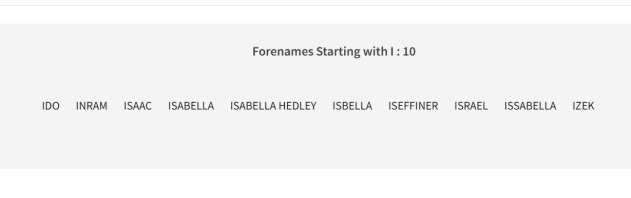
5. To check, go back to the census and search on ‘Ido Bailey’ – and there she is, aged 5, living with her family in Southgate Street!
FreeREG: here’s how to do it
Using the Names feature in FreeREG is slightly different, so to demonstrate, let’s take another example and follow the steps.
We are looking for the baptism of Peter Mansbridge (son of William and Mary) who is from Portchester in Hampshire, but we have not been able to find the record.
1. First, go to FreeREG, and then click on 'Records'.
2. Choose your County (Hampshire) and click ‘select’.
3. Choose your Place (Portchester) and click ‘select’.
4. Click on ‘Names’ (just under the main menu bar).
5. Then search the list (which appears with Surnames first, and Forenames below that). Under Forenames, we find ‘Petter’, which might just be ‘Peter’.
6. To check, go back to FreeREG, search on ‘Petter’ in Portchester, Hampshire, and there it is – the baptism record for our Peter Mansbridge in 1809 at St Mary’s Church, with parents William and Mary.
New FreeBMD - here’s how to do it
Using the Names feature in the new FreeBMD is different again from FreeCEN and FreeREG. Let’s take another example and follow the steps.
We are looking for a birth record for Dominic B Kohlar who you know was born around April 1929 in Hackney, London, but you can't find him.
1. First go to the new FreeBMD, and click on ‘Database’.
2. Under ‘Select a county’, insert 'London' and click on ‘Find’.
3. Under ‘District’, click on 'Hackney'. (If you know the county, you can select it from the dropdown below or type it into the ‘find matching districts’ field)
4. Scroll down to the ‘Personal Names’ section on the right, and click on ‘Birth forenames’.
5. Type ‘Dom’ and then click on ‘Filter names’. (This should bring up all variants of Dominic.)
6. Click on ‘D’ and have a look through the names to see if there are any you could try searching on. For example, at the end, you see ‘Domonic B B’. Could this be your man?
7. Go back to the Search page on FreeBMD, and look for ‘Domonic B B Kohlar’ - and up comes the birth record - usefully with a mother's maiden name. You're 99% sure this is your man, so it's worth ordering the birth certificate from the General Records Office.
These are very simple examples, but you get the gist! So, if you can’t find someone in the new FreeBMD index, census or parish records, why not experiment with a search through the Names features?
Happy hunting!