• Why am I seeing low-quality adverts on FreeUKGenealogy websites?

    We've had a few people get in touch recently asking why some of the adverts they see on our websites don't seem very relevant, and in some cases feel a bit... low quality.

    The answer usually comes down to one simple choice: whether or not you accept personalised advertising via cookies.

    What's the difference?

    When you visit our sites, you're asked whether you're happy to accept cookies. One of the ways we use them is to allow our partners to determine which adverts you may see: in other words, whether or not you’ll receive personalised adverts. If you accept cookies, the ads you’ll see will be personalised ads, since you’ll enable advertisers to show you content based on your interests (for example, genealogy services, books, or things you've searched for elsewhere).

    If you decline cookies, you’ll still see ads, but advertisers are no longer able to tailor what you see.

    That second option is absolutely fine, and entirely your choice. However, it does have an unintended side effect.

    Why do the ads look worse?

    Advertisers try to show their ads to people who are likely to be interested. If personalisation is switched on, they can target those audiences more precisely.

    If personalisation is switched off, that targeting isn't possible. As a result advertisers will show ads “blindly”, i.e. the ads that appear are often more generic, or sometimes the kind of "clickbait" content many people dislike.

    So it's not that we are choosing to show poorer adverts. It's due to how the advertising ecosystem works behind the scenes.

    An example of a low-quality advertisement

    Why do we show ads at all?

    FreeBMD, FreeCEN, FreeREG, and (soon) FreePRO are free to use and always will be. However, keeping it free for you has a cost

    Advertising is our main source of income and helps us to:

    • keep the websites running
    • maintain and improve the data
    • support our volunteers and infrastructure

    Without it, we wouldn't be able to provide access to over 500 million records for free.

    At the same time, we know that advertising can affect how the site feels to use. We are committed to finding the right balance between generating the income we need and providing a good experience for our users. We are actively testing and finding ways to improve how adverts are displayed, with the aim of making them less intrusive while keeping our services sustainable.

    An example of a better quality advertisement

    What can you do?

    You are always in control of your preferences. If you are seeing adverts that feel irrelevant or poor quality, you may wish to review your cookie settings and consider allowing personalised ads. Many users find this results in more relevant and less intrusive advertising.
    If you prefer not to, that's completely fine too. We respect that choice, and we'll continue working to improve the experience as much as we can within those constraints.

    We’d love your feedback

    We are actively exploring ways to improve both the user experience and how advertising appears on the site. If you have thoughts, please do get in touch via the Contact form.


  • Brick Wall Challenge: Open Data Day 2020

    We have been inundated with responses so have closed for this year.

    ___________________________________________________

    We're holding a 'Genealo-thon' on Saturday the 7th March, using our records to help break down your brick walls.

    Why not get some fresh eyes on your Brick Wall Ancestor? This year for Open Data Day we're hosting a Brick Wall Challenge! Send us as much information as you have on your 'brick wall' ancestor (BWA) and the Free UK Genealogy community will try to help you push that ancestral line back a generation using our freely available Open Data.

    Use the form below to tell us as much as you can about your BWA and if your application is progressed we will be in touch!

    When sending us a FamilySearch tree link, please make sure the focus is on your brick wall ancestor, or other ancestor; if it is on yourself, we won't be able to view your tree.

    If you'd like to be involved from the other side, to help break down the Brick Walls, this is the page for you: https://www.freeukgenealogy.org.uk/news/2020/02/14/brick-wall-team/

  • Accessibility Improvements: New Colours For FreeCEN & FreeREG

    In the summer of 2016, Free UK Genealogy began a journey to make all of our websites accessible to a minimum AA standard of W3C Web Content Accessibility Guidelines (WCAG) 2.1. People may struggle to access our services due to advancing age, long-term health issues, and/or disability, which can often make access difficult or impossible. We're committed to removing all barriers to access of family history information and so we arranged for our most newly-developed website at the time, FreeREG, to undergo accessibility testing at The Shaw Trust (you can read about that here, in our News article)

    A few weeks later, we received the report which told us what we already knew: users with accessibility issues found it difficult or impossible to use our websites, even with assistive technologies. So we set to work to make the improvements required, with the vast majority of it being done by our volunteers. 

    One of the biggest jobs to come out of the audit was the insufficient colour contrast. The report stated:

    The combination of text and background colour should be set to create an easy to read website. Using colours that are similar for the background and foreground can cause blocks of text to become difficult to read.

    If the text size is at least 18 point if not bold and 14 point if bold, the minimum colour contrast ratio should be at least 3:1, if the text is less than 18 point if not bold and less than 14 point if bold, the minimum colour contrast ratio should be at least 4.5:1.

    Throughout the site there are combinations of colours that fall below the minimum contrast levels that make the text difficult to read.

    “There are instances where the text is made harder to read because of the colour combination used on the website when reading and hovering the mouse over certain links.”
    (Colour contrast tester)

    The new Free UK Genealogy logos

    It’s taken us longer than we would have liked, but we recently released the new colours on FreeREG and FreeCEN, and the new FreeBMD website (FreeBMD2) will also be part of this new suite. Alongside the design colours changing we’ve also made the font heavier, as the text being to light and difficult to read was a complaint we frequently heard from our users. We hope that these advances provide genealogists using our websites with a more enjoyable research experience!

    Visit FreeCEN and FreeREG now, to see these improvements and let us know what you think via the Contact Us link in the footer.

  • Update on the 'New' FreeCEN Website

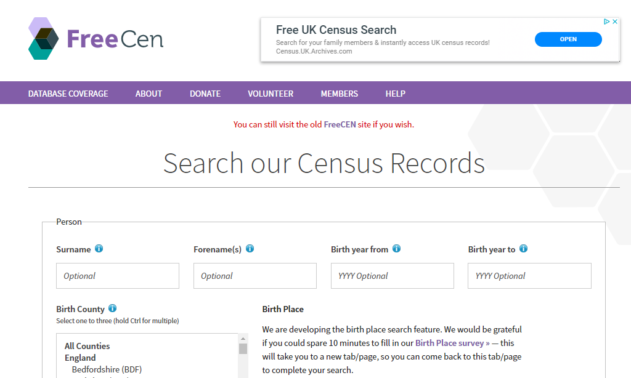
    The new FreeCEN website went live in July 2017 and has recently undergone an accessibility-driven aesthetic revamp. The release of the new colour suite across FreeCEN (pictured below), FreeREG, and the new FreeBMD website (FreeBMD2) currently in development represents many months of hard work and dedication applied by the Free UK Genealogy Volunteer Development Team. However, since we unveiled what was initially known as FreeCEN2, we've been making improvements and adding new features to enhance researchers' experience. 

    FreeCEN's new colours and darker, more visible text

    What's been improved so far?

    We knew what we needed to improve because users of the new website were invited to give us feedback via a survey. Hundreds of responses came in, with many of you asking for certain features that you find useful in the original FreeCEN website as well as helping us identify bugs that we were then able to fix, including table layout issues and ads obscuring page text.

    Other work (including changes required for GDPR and development of the new FreeBMD website - FreeBMD2) has affected our capacity to be able to develop many of the the search features you asked for on FreeCEN2. We're now able to turn our attention to these improvements, and in the last few weeks we've addressed another major accessibility issue you told us about: the formerly light, spindly text on our 2nd generation search websites is now a heavier weight. This website (www.freeukgenealogy.org.uk) is yet to undergo this font change, and you can see the contrast below.

    Comparison of new darker text and former 'light' text.

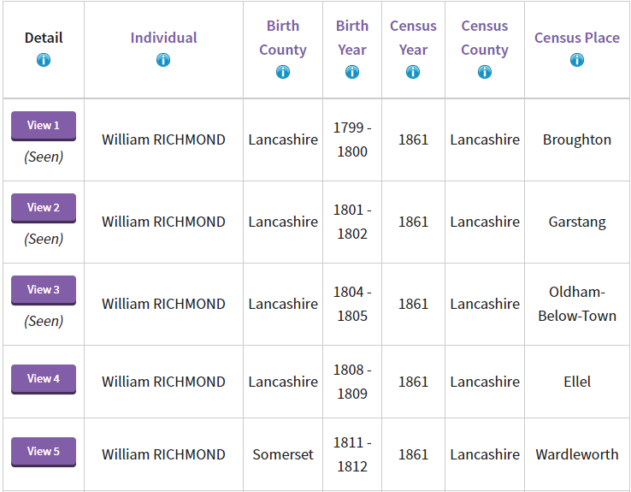
    Users often request that we make it possible for them to be able to easily differentiate between the rows in the list of search results, and see which records they've viewed out of the list. This has been recently achieved, by numbering each record/row and the word 'Seen'  being displayed below records viewed when the 'Back to Results' button is used in that session (this disappears when the search is performed again or a new search is done).

    Example of numbered rows and 'Seen' on viewed records

    What features are in the pipeline?

    We're now making the search features a priority on FreeCEN, and plan to add the ability to:

    • search by address
    • search all of a country
    • search without inputting county
    • search by area/'place'
    • search by folio, page etc
    • search by occupation
    • search multiple census years
    • free text place name search

    ...amongst other features.

    We know many of you will be disappointed that improvements to the searches related to place are quite limited. This has turned out to be a set of very complex problems - caused by the changing names and boundaries of the Registration Districts, the fact that Registration Districts sometimes cross county boundaries, the changing definition of places such as "London" over the last 250 years, and the variants of the way places were spelled. While we work out solutions, you will be able to use a free text place name search which will help.

    Early in 2020 we released additional filters you can use to refine your search of our census records. You can now filter results by:

    • Marital Status
    • Language
    • Sex
    • Occupation
    • Disability